Emonad Pixel Pack
Emonad as a pixel character for your game. 179 animations: idle, walk, run, combat, traversal, swimming, four guns. Three PNG sheets and one JSON file. Free.
See what he can do
The pack in play: a platformer and a top-down garden, every move in a real level. Tap a chapter to jump to it.
Drop it into your game
Three PNG sheets and one JSON file, 1.4 MB zipped. Any engine that can draw part of an image can run it.
Using Claude Code, Cursor, Copilot, ChatGPT or Replit? Hand it this.
Three steps. The prompt tells your AI everything it needs about the sheets, so it writes a loader that is right the first time.
- Download the pack and unzip it into your project, so
emonad-sprites/sits next to your code. - Paste the prompt below into your AI, then tell it what game you want ("a platformer where Emonad runs across rooftops", "a top-down shooter in a graveyard").
- Point it at
emonad-sprites/README.mdif it asks for more: every row, every rule, the same words as this page.
The prompt
I have a pixel-art character sprite pack in ./emonad-sprites/ (Emonad, from emonad.lol/game-assets). Use it for the player character.

The pack:
- Three PNG sprite sheets: "sprite sheet.png" (idle + walk, 4 directions), "sprite sheet actions.png" (every action), "sprite sheet weapons.png" (pistol, rifle, shotgun, rocket launcher, bat).
- Every sheet is a grid of 76x78 px cells, 8 cells across. Frame index = row * 8 + column.
- actions.json lists every animation: { name, sheet ("base" | "actions" | "weapons"), row, frames, fps, loop }. 179 animations. Load this file and build the animations from it; never hard-code rows.
- Names: "<action>-<dir>", dir is right | left | down | up. Left and right are drawn separately: use the -left row, do not mirror -right. "-down"/"-up" rows face the camera / away from it, for top-down games.
- Actions: idle, walk, run, jump (6 frames: 0 prep, 1 launch, 2 rise, 3 apex, 4 fall, 5 land; pick the frame from the vertical velocity), flip, crouch, crawl, slide, roll, dash, punch, kick, throw, block, pickup, push, hang, mantle, wallslide, swim, sit, hurt, death, climb, celebrate, interact, swing (bat); guns: -aim, -shoot, -reload, -walk, -crouchshoot, -aimup, -airshoot, -hurt.
- The feet are on cell row 63; put cell row 64 on the floor and every grounded animation lands on it. Airborne rows carry no offset.
- loop:false animations play once and hold the last frame (death ends lying flat).
- Draw whole cells with nearest-neighbour filtering at a whole-number scale (2x, 3x or 4x); never smooth, never scale fractionally.
- frames/ holds every frame as its own PNG (name-N.png) if the engine prefers single images.

Write the sprite loader and animation player first, from actions.json, and show the idle, walk, run and jump working before building the game. const meta = await (await fetch('actions.json')).json();
const sheets = {};
for (const [key, s] of Object.entries(meta.sheets)) {
const img = new Image(); img.src = s.file; await img.decode(); sheets[key] = img;
}
const anims = Object.fromEntries(meta.anims.map(a => [a.name, a]));
// x, y = where the feet touch the ground; t = seconds since the animation started
function draw(ctx, name, t, x, y, scale = 3) {
const a = anims[name], n = Math.floor(t * a.fps);
const frame = a.loop ? n % a.frames : Math.min(n, a.frames - 1);
ctx.imageSmoothingEnabled = false;
ctx.drawImage(sheets[a.sheet], frame * 76, a.row * 78, 76, 78,
x - 38 * scale, y - 64 * scale, 76 * scale, 78 * scale);
}- Draw whole cells. Every cell is 76×78 and the character sits in the same spot in every cell of a row, so nothing drifts between frames.
- Feet are on row 63 of the cell. Put row 64 on your floor and every grounded animation lands on it.
- Nearest-neighbour, whole-number scales.
imageSmoothingEnabled = false,image-rendering: pixelated, 2×/3×/4×. - Left and right are real rows. The artist drew both heads; use the
-leftrow rather than flipping-right. - Airborne rows carry no offset. Jump, flip, fall, hang, mantle and swim stay where you put the sprite; pick the jump frame from your velocity (0 prep, 1 launch, 2 rise, 3 apex, 4 fall, 5 land).
loop: falseplays once and holds the last frame. Deaths end lying flat; frame 3 ofdeathis the impact, start there for a fall.
The sheets
Three PNGs, 76×78 cells, 8 across. Tap one to open it.
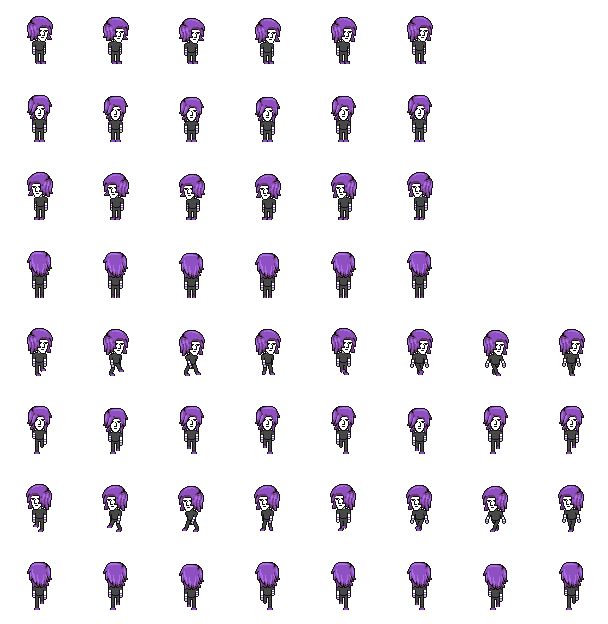


In the pack
| sprite sheet.png | Idle and walk, four directions. 8 rows. |
| sprite sheet actions.png | Every body action and the top-down set. 77 rows. |
| sprite sheet weapons.png | Pistol, rifle, shotgun, rocket launcher, bat. 94 rows. |
| actions.json | Every animation: sheet, row, frames, fps, loop. |
| frames/ | Every frame as its own PNG, full cell. |
| README.md · LICENSE.txt | Row maps, the rules above, the licence. |
The palette
Eight colours and transparency. Swap them and the whole set recolours.
Can I use this in a commercial game?
Yes. Use, change and ship the sprites in your own games and projects, paid or free. Credit ("sprites by Emonad, emonad.lol") is appreciated, not required. Don't resell the files themselves as an asset pack, and don't claim them as your own drawings. The full text is in LICENSE.txt.
Which engines does it work in?
Any that draws sprites from a sheet: plain canvas, Phaser, PixiJS, Godot, Unity, GameMaker, Love2D, Pygame. Point the engine at the PNG and a 76×78 grid (8 across, so frame index = row × 8 + column), read the rows from actions.json, and set texture filtering to nearest. The tabs above have Phaser, Godot and Pygame loaders, and the prompt above tells an AI assistant all of it.
What are the top-down rows for?
Rows ending in -down and -up face the camera and away from it, for top-down or tilted-camera games. The side rows do the other two directions. The top-down and tilted 3D examples above use exactly that.